Dedithering And Cleanup
Dedither replaces locally unsupported pixels with neighboring colors. It is a separate image-cleanup pass, not a quantization algorithm or a simulation of what your nozzle can print.
Use it on repeated-color dither patterns or a reduced image with isolated speckles. It can work before quantization when the source already contains such patterns, or afterward on reduced regions. It is not a photographic noise-reduction filter: neighboring photo pixels often have slightly different exact colors.
How A Pixel Is Chosen
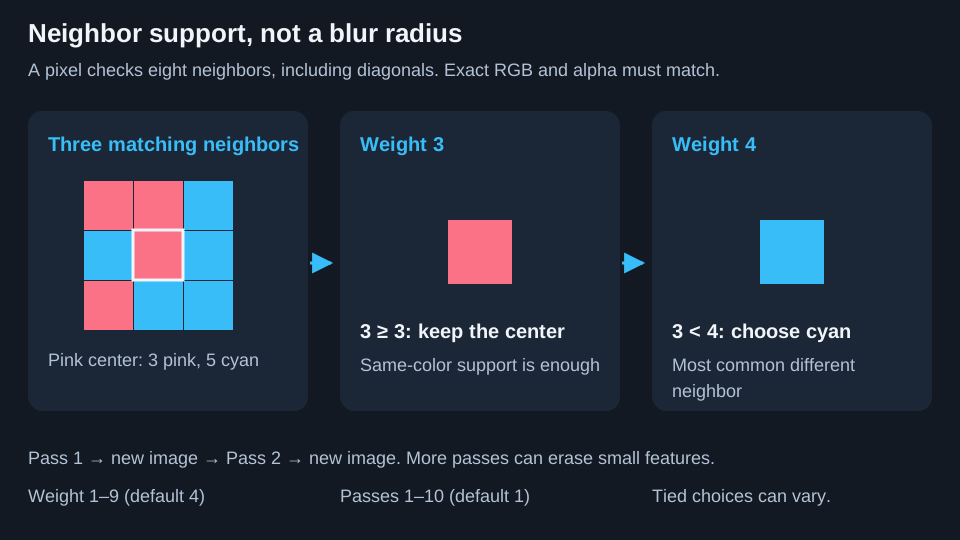
Each pixel checks its eight immediate neighbors, including diagonals. If enough match its exact RGB and alpha, it stays. Otherwise, it adopts the most frequent different neighboring color. Ties are chosen randomly, so identical settings need not produce identical runs.
Only existing neighboring colors, including transparent pixels, are used. They are not averaged into a new shade.
Weight
Weight is the matching-neighbor count needed to keep the original pixel. Range 1 to 9; default 4.
| Example | Result |
|---|---|
| No matching neighbors | Changes if another neighbor color exists, even at Weight 1. |
| Three matching neighbors | Stays at Weight 3; eligible for replacement at Weight 4. |
| Center and all eight neighbors match | Stays even at Weight 9 because no different neighbor exists. |
Lower values tend to preserve details; higher values make more pixels eligible for replacement. With only eight neighbors, Weight 9 cannot meet the keep threshold. It is an aggressive boundary setting, not a larger radius. Border pixels also have fewer neighbors available.
Passes
Passes repeats cleanup from 1 to 10 times, default 1. Each pass reads the complete preceding result. Extra passes may remove stubborn speckles, but also move edges, break narrow connections, or remove small text.
Per-field reset arrows restore Weight 4 or Passes 1. The panel reset restores both. None restores the earlier image; use Undo for that.
Apply And Inspect
- Apply any active adjustments first. Dedither reads the adjusted view, and baking first avoids leaving live adjustments active over the cleaned result.
- Start with one pass. Weight defaults to 4; try lower values when fine features matter.
- Click Apply, then inspect outlines, lettering, and transparent edges at high zoom.
- Undo before comparing another setting on the same starting image.
Repeated Apply clicks continue cleaning the already-cleaned image. They are not independent comparisons with the original.
Effect On The Print
Removing isolated off-color pixels can eliminate tiny color islands, but also remove wanted details. Alpha participates in the vote, so Dedither can expand or shrink the silhouette and open or close holes.
It works in image pixels, not millimeters. A three-pixel detail at 0.1 mm/pixel spans 0.3 mm before later meshing or slicer decisions. Dedither has no nozzle-diameter input. Use the 3D printable-detail controls and slicer preview to check physical features.
Dedither Versus Height Dithering
| Tool | Where | What changes |
|---|---|---|
| Dedither | 2D | Exact-color regions and potentially the transparent outline of the source image. |
| Height dithering | Auto-paint in 3D | The generated surface-height pattern used to approximate target colors. |
Using one does not enable the other. Leave Dedither unapplied when preserving intentional pixel art or stippling.
Next: 3D mode.