Auto-paint Controls
Auto-paint predicts thin filament layers over one another and chooses printable heights for the prepared image. Several visible colors can come from different thicknesses of one physical filament. Twenty image colors therefore do not necessarily need twenty spools.
Set physical size, layer heights, and effective line width, add filaments you can actually load, wait for calculation, then Build 3D Model. Inputs recalculate automatically; displayed geometry updates only when you build.
Filament Inputs
| Control | What to enter or do | Effect |
|---|---|---|
| Add Filament | Create a new neutral-gray row. | Adds an available material, not a physical printer slot. |
| Color swatch / Hex | Choose the filament's opaque color or enter hex. | Changes blends and exported material color. Enter the actual spool color, not a desired output color. |
| Name | Give the spool a useful label. | Identifies it. A blank name returns to an automatic color-based label. |
| HD | Frontlit hiding distance, 0.01 to 2 mm. | Shorter HD hides lower colors faster. Longer HD needs more thickness and transmits more at the same thickness. |
| Convert from TD | Enter conventional lithophane/backlit Transmission Distance and press Convert. | Converts approximately TD × 0.1, rounded to 0.01 mm and bounded to the HD range. Do not convert an HD value again. |
| Wand | Estimate HD from color. | A starting guess, not a measurement. |
| Status badge | Inspect Estimate or a calibrated confidence label; hover for RGB-channel values. | Describes HD evidence for this row, not whole-image accuracy. |
| Trash | Remove the row. | That filament is no longer available. Saved profiles are unchanged until saved. |
| Calibrate | Open Hiding Distance, Palette Proof, or Stack Matrix. | Record physical evidence using Calibration workflows. |
Committing an HD value, converting TD, or using the wand clears that row's stored HD calibration. Changing a calibrated filament's color makes its calibration inactive and uses a color-derived estimate. Reverting to the measured color can reactivate preserved calibration unless it was cleared or replaced meanwhile. A name change is not a measurement.
Measured channel behavior affects both predicted color and transition thickness. If material or process changes, do not assume the old preview remains verified.
Filament Profiles
Loading a saved profile replaces the working filament set. Unsaved changes means the current set differs from the selected profile.
| Action | Result |
|---|---|
| Save changes to current profile | Overwrite the editable profile with the current set. Disabled when unchanged, no profile is selected, or a template is selected. |
| Save as new profile | Enter a nonempty name to save separately, including modified templates. |
| Rename selected profile | Change its label without changing filaments. Unavailable for templates or without a selected profile. |
| Import profile from file | Read native .kfil, legacy .kapp, JSON, or supported HueForge spool CSV/TSV. |
| Export current filaments as .kfil file | Export the current set. Desktop opens Save As; browser uses its download flow. Cancelling does not change calibration. |
| Delete selected profile | Remove the saved profile. Export a backup first if needed. Templates cannot be deleted. |
Appearance evidence belongs to an exact filament setup. While a selected profile has unsaved edits, its saved appearance evidence is not passed into Auto-paint. Exporting those edits creates a separately named profile without incompatible appearance evidence from the old set. Active per-filament HD calibration is separate from profile-level matrix and proof evidence. See profile compatibility and import handling.
Templates
Supplier templates supply advertised colors, names, brands, and estimated HD values. They are read-only. Remove colors you do not own, calibrate, then Save as new profile. Supplier reference colors are not guarantees for a batch or viewing condition. Templates are unofficial, not supplier endorsements.
Standard Matching
With Enhanced color matching off, Kromacut sorts filaments dark to light by luminance and calculates their transitions. It does not follow the row-addition order. The image-to-height mapping also uses luminance: it normalizes brightness between the darkest and lightest nontransparent image pixels, places that range between the foundation surface and the stack's top, then snaps to printable layers. Two different hues with equal brightness can therefore receive the same height, regardless of their hue. Repeats, separation, height dithering, and optimizer controls are inactive.
Use this simpler baseline for brightness-led relief. Enhanced matching considers image color when choosing both the material sequence and printable color assignments, so it is the appropriate mode when hue distinctions matter.
Max Height
Clear Max Height or press Auto for the calculated, layer-aligned stack height. The field accepts 0.5 to 20 mm. A cap is a ceiling, not a target, so the result can be shorter.
A cap between valid layer boundaries rounds down. If the normal transitions are too tall, Kromacut compresses them and displays the automatic height for comparison.
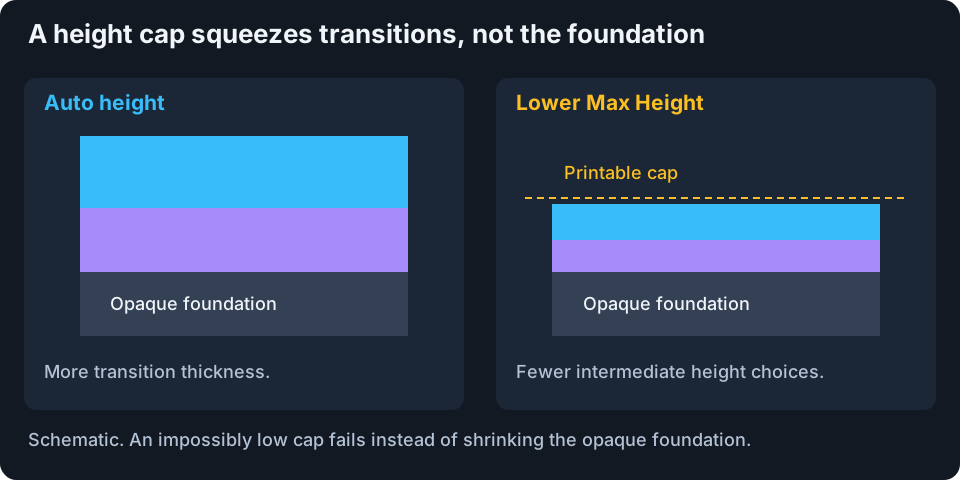
Schematic. Colored bands identify material runs, not predicted blended appearance.
The foundation must still achieve about 95% opacity in every modeled RGB channel. An insufficient cap rejects the stack rather than treating translucent backing as opaque. Increase the cap or use a foundation-capable filament with shorter HD.
Compression can remove useful intermediate colors. It is not uniform scaling of an otherwise identical image. In Flat Paint, the clear carrier is additional geometry and its first-layer layout differs from relief. Check the full Model dimensions and slicer thickness; Max Height is not the carrier-inclusive slab thickness.
Printable Detail
Set Effective line width in 3D Print Settings to the slicer's intended extrusion width, not nozzle diameter or Pixel Size. Auto-paint's width-warning preview and optional isolated-speck cleanup use that same setting; their controls remain here.
Think of a two-pixel purple stripe on a blue background. At 0.10 mm/pixel, the stripe is 0.20 mm wide. If your planned extrusion line is 0.40 mm wide, that stripe is narrower than the line. Kromacut can flag it as at risk, but keeps the stripe even with cleanup on. A thin visible image region can be part of a much wider underlying material layer, and slicer toolpaths can preserve detail that this image-only check flags.
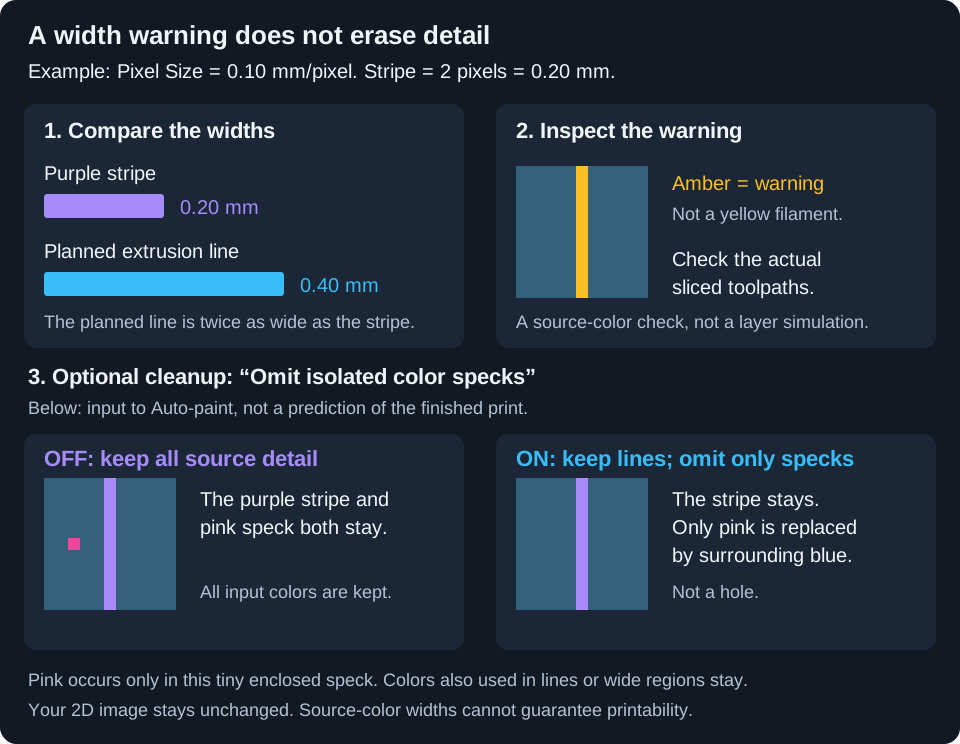
This is a width estimate, not an exact slicer toolpath. The colored bars compare widths; the squares show the example image.
Omit isolated color specks gives you two choices:
- Off: keep all source pixels in Auto-paint's input, including every highlighted region.
- On: replace only colors used exclusively in tiny, compact, enclosed specks with their surrounding wider color before matching and model generation. A speck's full extent must be smaller than the effective line width, and it must have one unambiguous surrounding color with a wider region. If that source color is also used in a line or larger region anywhere in the image, it is kept everywhere.
Thin lines, diagonal connections, branches attached to wider regions, image-edge detail, and specks beside transparency or multiple colors are kept. Cleanup never turns a pixel into a hole or edits your original 2D image. It is deliberately cautious and may leave unwanted speckles; use 2D cleanup for broader image editing.
Use Open preview to inspect:
- At risk: amber marks thin source-color regions near wider colors; pink marks thin regions without a wider neighbor. Other pixels are dimmed. These are warnings, not a prediction that the detail cannot print.
- Result: the pixels Auto-paint receives after the optional cleanup. This is not a slicer preview or a printability guarantee.
- Flagged / eligible / omitted: the width-warning fraction, pixels meeting the isolated-speck rules, and the actual number replaced. Flagged pixels kept explicitly counts warnings that do not change the image.
When eligible speck colors are omitted, Auto-paint uses the cleaned image to count target colors and plan the stack. Removing an entire target color can change matching choices elsewhere, so inspect the rebuilt result. A nonzero warning percentage with 0 pixels omitted means cleanup has kept all source detail.
After changing the toggle, let Auto-paint finish calculating and click Build 3D Model again. The analysis measures connected source-color regions, not physical material layers, walls, infill, or variable-width extrusion. Always check the sliced toolpaths. If detail really is lost there, increase the model's XY size, widen it in 2D, or choose a finer extrusion width that your printer and slicer support.
Enhanced Color Matching
Enhanced matching searches material sequences for the current 2D palette. It can omit filaments that add no useful coverage. Eight available spools need not produce eight runs.
The optimizer does not secretly reduce the prepared palette again. More source colors require more work. Prepare the image in Reducing colors, then judge its achievable appearance in 3D.
Turning enhanced matching off also disables separation and height dithering. New calculations cancel older ones; progress is approximate. A failed calculation cannot fall back to an unrelated manual stack. An older built model may remain visible until you build a valid new result.
Total repeat limit
Choose Off, or up to 2, 4, 6, 8, or 12 extra appearances for the entire stack. This is neither a per-filament allowance nor an exact swap count. Black → yellow → black uses one extra appearance of black. Returning to a material over a new substrate creates another possible blend path.
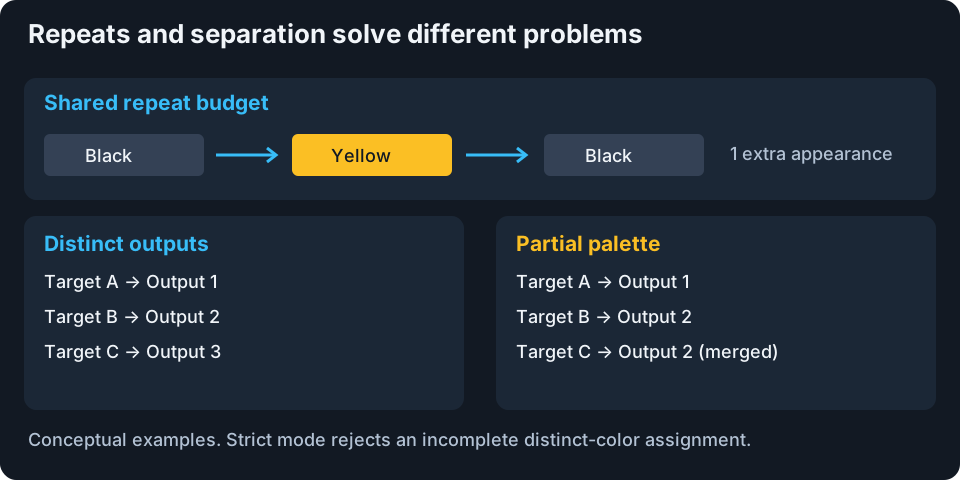
Conceptual sequences and assignments, not material predictions.
More repeats allow a wider search and potentially more print-time material changes. The budget is a ceiling. Unneeded runs can be omitted.
Preserve color separation
Ordinary matching may map different image colors to the same output. Enable Preserve color separation when those distinctions matter, such as lettering against its background or adjacent face tones.
Unique-match limit (ΔE) is a hard maximum color difference for an image color to own a distinct printable output. Range: 1 to 100; default: 6. Lower values demand closer matches and are harder to satisfy. Higher values allow more error, not better physical filaments.
Require a unique match for every color is enabled by default. Incomplete assignments fail. Turn it off for a partial palette: unmatched colors lose their distinct outputs and merge into surviving mappings. The image stays filled but loses distinctions. If no color is eligible, even partial mode fails because nothing survives to merge into.
The optimizer first maximizes preserved colors and source-image coverage. Then it prefers fewer repeated appearances, fewer material runs, and fewer physical layers, before lower in-limit error. Repeat allowances are explored progressively and search can stop once every color is preserved. A final deletion check removes individual runs that do not improve those priorities.
For strict failure, consider fewer 2D colors, more height or repeats, another suitable filament, a larger ΔE limit, or partial merging. Choose the tradeoff you actually want instead of raising a limit just to dismiss the error.
Separation and Height dithering are mutually exclusive. Enabling either turns the other off.
Height Dithering
Height dithering can distribute rounding error across small blocks at neighboring printable heights when its input contains heights between the available layer boundaries. Those height differences can suggest intermediate tones from a viewing distance. It requires enhanced matching and acts on the exported height map, not the 2D source image.
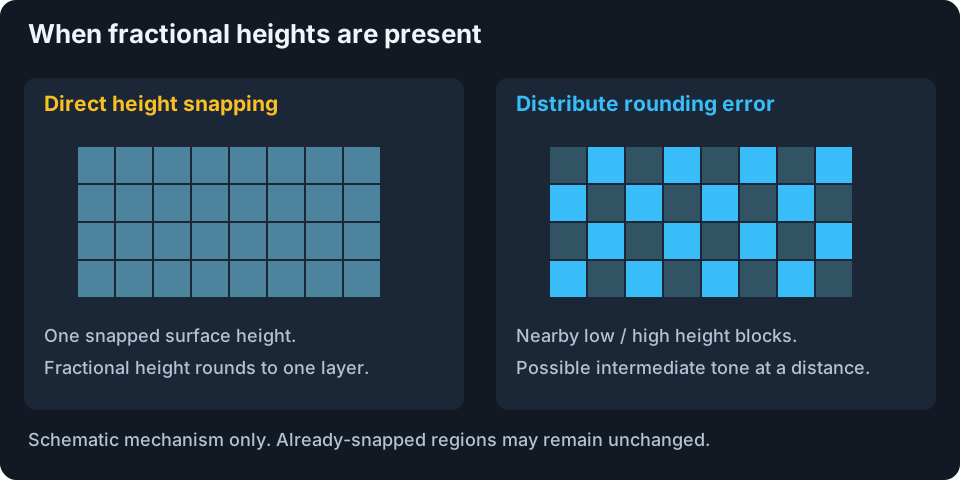
Schematic mechanism, not a guaranteed before-and-after result. Different top heights do not mean additional spool colors.
Many current Auto-paint mappings already select a discrete printable layer before this step. Those already-snapped regions have no fractional-height error to distribute and may remain unchanged when dithering is enabled. Use the rebuilt preview and slicer to check whether this particular image actually gains height variation; enabling the toggle does not guarantee more tones or visible dots.
Dot size follows Effective line width in 3D Print Settings relative to Pixel Size, rounded to a whole-pixel block size. This is approximate, not an exact minimum-width guarantee. Edge regions avoid the same dithering treatment to reduce boundary artifacts. Check the slicer for tiny islands and extra travel.
Where fractional-height error is available, redistribution can help broad tones while making tiny graphics noisy or geometry heavier. It cannot add missing gamut or validate unsupported calibration. When it creates many small regions, combining it with Flat Paint can be especially expensive because those regions share each full-footprint layer.
Optimizer Settings
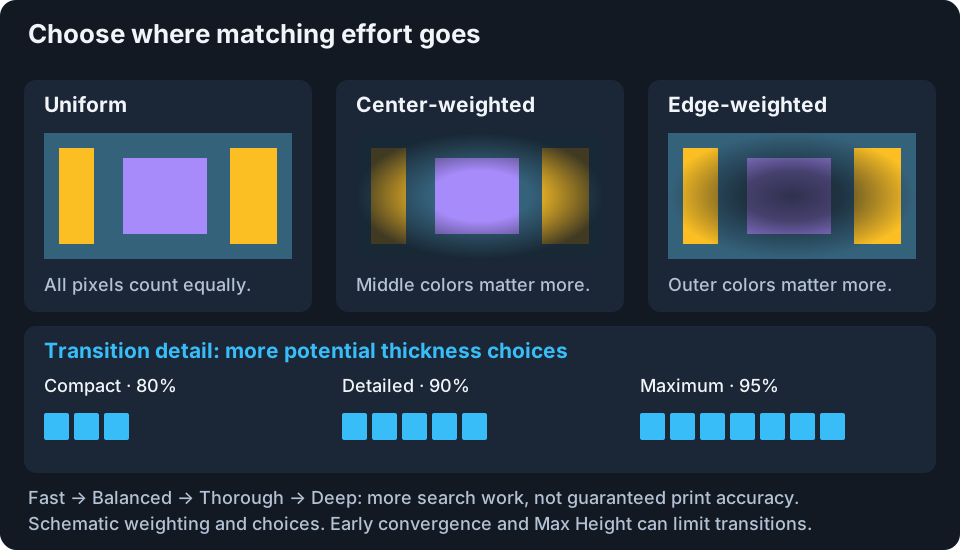
Schematic weights and choices, not measured colors or exact layer counts. Dimmed regions receive less priority; they are not removed from the image.
| Control | Choices and effect |
|---|---|
| Algorithm | Fast: narrower, quicker search. Balanced: general-purpose default. Thorough: deeper multi-start refinement. Deep: wider, more expensive search. Exact base order: enumerate applicable no-repeat orders. |
| Region priority | Uniform: equal pixel weight. Center-weighted: favor colors near the center. Edge-weighted: favor colors near image edges. It changes matching priorities, not the crop or extrusion. |
| Transition detail | Compact (80%), Detailed (90%, default), Maximum (95%) set transition opacity endpoints. Higher values permit taller transitions and more printable intermediate colors, subject to early convergence and the height cap. |
| Seed (optional) | Automatic uses a stable input-derived seed. Enter an integer to compare a different deterministic search; clear to restore automatic. Not a quality slider. |
Transition detail affects upper material transitions, not the opaque-foundation requirement. It does not increase image resolution or narrow line width. Added transition colors may not help the current image.
For the same seed, higher heuristic tiers retain the best result from the lower tier. This is still optimization of predictions. Exact base order checks 109,600 nonempty orders at eight filaments and 986,409 at nine. Repeats use separate refinement, not exhaustive proof of every repeated stack.
Transition Zones And Confidence
| Readout | Interpretation |
|---|---|
| Transition Zones | Physical material runs with start, end, and thickness. Compressed badges indicate less than ideal thickness. |
| Total height / physical layers | Calculated stack dimensions, not image-color or spool count. |
| Color separation status | Preserved and merged colors, printable capacity, worst preserved ΔE, and repeats. Merged targets are not successful above-limit matches. |
| Appearance model | Whether simulation, fitted behavior, local comparisons, or Stack Matrix evidence supports prediction. A measurement count does not mean every output was measured. |
| Prediction confidence: average / lowest | Evidence strength of actual mapped colors. The weighted average can hide a weak region revealed by the lowest value. Counts distinguish measurements, interpolation, fitted predictions, and simulation. |
| Result Confidence | Combined HD calibration, coverage, and compression indicators. Not a measured accuracy percentage and not identical to prediction confidence. |
| Calibration / Coverage / Compression | HD evidence quality, filament coverage of source colors, and height-cap impact. High scores do not certify the print. |
| Quality Score | Optimizer comparison, not measurement. In incomplete non-strict separation the label becomes Partial palette. |
| Iterations / Cache hit | Search work and result reuse. More iterations are not proof of better color. |
| Exact optimum / Best found | Exhaustive applicable no-repeat comparison versus heuristic or repeated-stack refinement. Neither proves physical accuracy. |
| No removable run | No one-run deletion preserves the selected priorities. A different multi-run rearrangement might still be better. |
Evidence weakens away from measurements, when nearby observations disagree, or when held-out predictions miss measured colors. Ordinary matching can include a bounded uncertainty cost. Separation still uses raw ΔE for eligibility, so uncertainty cannot make an out-of-limit color valid.
After changing process or layer height, inspect this evidence summary. A high general calibration score does not mean every new recipe is supported. See Calibration workflows.
Suggest Next Filament
Suggest next filament appears after a result exists. It seeks a hypothetical color that could improve this image's coverage. It is not a product listing or a spool already loaded in the printer.
| Field or action | Meaning |
|---|---|
| Hex swatch | Suggested opaque filament color. |
| Est. ΔE +…% | Estimated reduction in blend-aware average image error if added. Higher is better; not confidence. |
| HD | Starting estimate borrowed from the nearest existing filament by perceptual color distance. Not measured for a product. |
| Captures | Percentage of image pixels with improved estimated error. |
| Isolation | Distinctness from current filaments on a 0 to 1 scale. Higher indicates a more separate coverage gap. |
| Add to filaments | Add a working row named Kromacut-Suggestion-… and recalculate with it. |
Find a real spool if the suggestion is useful, then enter its real color and calibration. Do not print assuming the hypothetical row is already available. Suggestions reset when the image colors or filament set changes. A no-candidate result says the current set already covers the image well under this approximate test.
Next: Flat Paint, Calibration workflows, or Generating and exporting output.