Flat Paint
Flat Paint is an Auto-paint layout available with standard or enhanced matching. It makes a constant-thickness slab instead of stepped relief. Every printed layer covers the model footprint, with different materials potentially sharing a layer side by side.
Use a multi-material workflow such as AMS, CFS, or a toolchanger with suitable slicer support. A manual filament change at one height cannot supply several materials side by side on that layer.
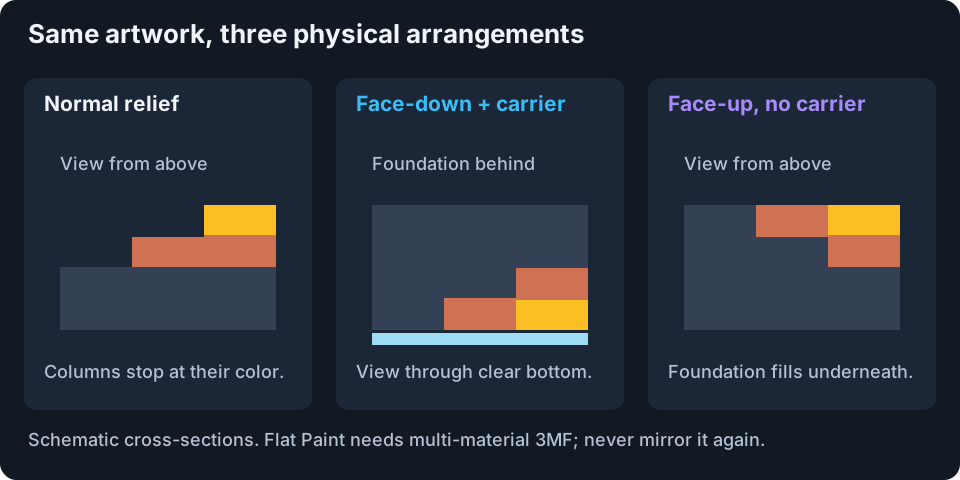
Conceptual cross-sections. Colors identify materials; the labels identify the viewing face.
Default: Face-down With Clear Carrier
Enable Flat Paint and leave Face-up, no clear layer off.
- The transparent carrier prints first and becomes the smooth viewing face against the plate. Assign its object to clear filament.
- Artwork columns reverse their normal material order for viewing from below. Foundation material fills behind shorter columns.
- Export 3MF and keep its orientation. The artwork is already mirrored; do not mirror it again in the slicer.
- After printing, flip the part over to view through the carrier.
Text may appear reversed from the back in the slicer. Check the intended viewing side instead. Orbit underneath the Kromacut preview to inspect that face.
The carrier is extra geometry requiring real clear filament. On-screen transparency does not measure filament clarity or build-plate finish. Check complete thickness in the Model badge and slicer, not just Auto-paint Max Height.
Face-up, No Clear Layer
Enable this toggle to remove the transparent carrier:
- Each column keeps its normal bottom-to-top material order.
- Foundation material fills below shorter columns, aligning visible colors at a flat top.
- There is no carrier object or clear-filament requirement.
- Print face-up as exported, without mirroring, and view the exposed top without flipping.
These layouts have different geometry. Build 3D Model again after changing the toggle. Flipping an old export does not convert it between layouts.
Compare The Workflows
| Workflow | Viewing face | Geometry | Slicer assignment |
|---|---|---|---|
| Normal Auto-paint | Stepped top | Shorter columns stop earlier. | Physical material runs by height. |
| Flat Paint, default | Bottom through clear carrier | Mirrored, reversed columns with foundation behind. | Per-filament objects plus carrier. |
| Flat Paint, face-up | Exposed flat top | Normal order with foundation below shorter columns. | Per-filament objects; no carrier. |
Flat Paint and Smooth Meshing do not operate together. The slab uses full-footprint side-by-side regions instead of smoothed contours. Enabling Smooth Meshing disables Flat Paint; select the desired layout and rebuild when switching.
Export And Check
Only 3MF is offered. An uncolored STL would lose the meaningful material layout and leave a slab. Objects are grouped by real filament, not by every predicted blended color.
- Match regular and first-layer heights to Kromacut.
- Keep scale and exported orientation. Do not add another mirror operation.
- Assign every object correctly, including clear filament for a default carrier.
- Inspect individual slicer layers for side-by-side regions and a complete slab.
- Confirm text direction from the intended viewing side, then check swaps and print time.
Print Instructions replaces the manual swap list with layout-specific multi-material guidance. Layer Preview has a plain track because each layer can contain multiple materials. Its cutoffs still affect inspection only, never the complete export.
Cost And Detail Tradeoffs
A flat face is not necessarily a simpler print. Filling the footprint on every layer adds material and heavier geometry compared with relief. Thin layers, tall stacks, and Height dithering can produce many small regions, more travel, and slower building, export, or slicing.
Kromacut warns about large Flat Paint jobs before building. Build Anyway accepts that workload; it does not certify printer suitability. Test a small piece when the material or finish is unverified. Flat Paint preserves the intended optical column arrangement, but still depends on calibrated materials and a matching print process.